
Cloud Sprout Web Hosting
  • 0 Shopping Cart
  • Home
  • Store
    • Browse All
    • Shared Hosting
    • VPS Hosting
    • SSL Certificates
    • Website Security
    • Website Builder
    • Website Backup
    • SEO Tools
    • VPN
    • E-mail Services
    • Professional Email
    • Register a New Domain
    • Transfer Domains to Us
  • Announcements
  • Knowledgebase
  • Network Status
  • Contact Us
  • More
  • Account
    • Login
    • Forgot Password?
  1. Portal Home
  2. Knowledgebase
  3. WordPress
  4. How to remove your post in WordPress?

  Categories

Backup/Restore
4
cPanel - Control Panel
24
Databases
11
DirectAdmin
38
DNS - Nameservers
6
Domain Management
10
Email
11
FTP
9
Installing a Control Panel
6
Mail Filters & SPAM
8
Mobile
11
Others
3
Security
10
Softaculous
76
SSL
8
WordPress
17

  Categories

  Support

My Support Tickets
Announcements
Knowledgebase
Downloads
Network Status
Open Ticket

How to remove your post in WordPress? Print

  • 0

You can remove your published or draft post in WordPress.


1. Login to your WordPress admin dashboard.


2. Under the dashboard menu, hover your mouse on Posts and then click on All Posts.
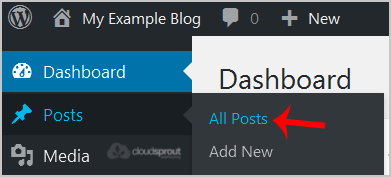
wp-first-time-all-post.gif


3. Choose the post you wish to remove, and the Trash option will appear, Click on it.
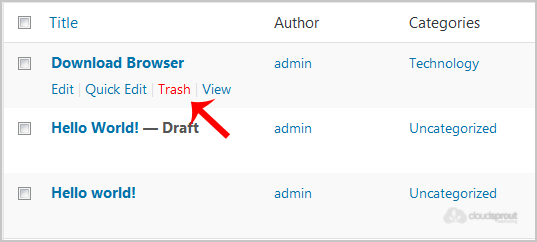
wp-removing-selected-post.gif

You will get a success message as 1 post moved to the Trash.


Was this answer helpful?

Related Articles

How to access the WordPress admin account? WordPress is a CMS software with an easy to access admin account and a simple to manage blog... How to Install a Plugin in WordPress? You can install a plugin in WordPress in several ways. The best way to install a plugin is to use... How to Manually Install a Plugin in WordPress? The automatic installation of a plugin is easy, and you can also install on manually. It will... How to Deactivate and Delete a Plugin in WordPress? If your plugin is not in use or you wish to deactivate it, you can do this from the WordPress... How to Forcefully Update a Plugin in WordPress? If your WordPress plugin is not working correctly or you want to re-install it even when it is...
« Back

  Support

My Support Tickets
Announcements
Knowledgebase
Downloads
Network Status
Open Ticket
  • Contact Us
  • Terms of Service

Copyright © 2026 Cloud Sprout Web Hosting. All Rights Reserved.


Loading...
Loading...

Generate Password

Please enter a number between 8 and 64 for the password length